-Wit
CODEOWNERS validation happens in real time on GitHub
When making a PR to change the CODEOWNERS file for a repo, GitHub automatically updates the linting when a team is given access to the repo. In the past, the validation would not get refreshed until you reopened the PR. I’m not sure when this happened, but I really appreciate the change.
It is not from the benevolence of the butcher, the brewer, or the baker that we expect our dinner, but from their regard to their own self-interest. We address ourselves not to their humanity but to their self-love, and never talk to them of our own necessities but of their advantages.
― Adam Smith, An Inquiry into the Nature & Causes of the Wealth of Nations, Vol 1
XKCD: Grownups

I think this might be my favorite XKCD of all time. What will being a grownup mean to you today?
GitHub Action Configuration Variables
Last week GitHub released a feature I’ve wanted for a long time, configuration variables in GitHub Actions.
Today, while I was pairing with a coworker, I got an excuse to use configuration variables, which made what we were working on much more straightforward.
GitHub Actions has the concept of environments, which is super handy since we set up a new app to deploy to different environments.
GitHub environments offer various options, including requiring approvals from users before deploying to that environment, associating branches with that environment, and associating secrets and configuration variables with that environment.
In the past, I used secrets to store information like what S3 bucket I wanted to use for a particular environment. This worked great since it abstracted the knowledge of where to push files from the pipelines and let me change settings without touching the pipeline files.
What was challenging about this approach was that GitHub treated every secret as if it was a secret that needed to be removed from logs and never visible after setting it.
Today we used a configuration variable to store the S3 bucket, and we could see the value while looking at the environment. We could also see the value in the logs where it showed us the full path as we did an s3 copy.
This might not seem too important, but it was critical because I typed the wrong bucket name when setting the new variable. We wouldn’t have noticed if it had been a secret until we ran the pipeline and it failed. Instead we noticed before hand, quickly corrected the value, and watched out deploy succeed.
If you’d like to start using configuration variables in your pipelines check out the docs Creating configuration variables for an environment.
GitHub is back from their holiday break
The fine folks at GitHub are back from their holiday break, and they want you to know about it. Last week they released 11 updates to their system, and I suspect one or two of them will catch your eye. Actions had three updates, Advanced Security had two, along with updates to Dependabot, 2FA, Mobile, Issues, Packages, and a feature for enterprise orgs.
Five updates caught my eye, two of which have been on my wishlist for a while.
No Code CodeQL Scanning Config
The first update that caught my eye is a no-code setup for CodeQL scanning of repos that can use GitHub Advanced Security. Currently, the no-code setup works for repos using Javascript/Typescript, Python, and Ruby. They say more language support is on the way, too, so don’t worry if those aren’t the languages you use.
If you have a public repo, this is free, and you should turn this on and start checking out the scan results. If you have a private repo, this functionality is only available as an add-on if you are an enterprise org. Also, GitHub Advanced Security costs “call for pricing.”
2FA validation after setup
Next up is Second-factor validation after 2FA setup. 2023 will be the year of 2FA at GitHub, “GitHub will require all users who contribute code on GitHub.com to enable one or more forms of two-factor authentication (2FA) by the end of 2023.” I think we can all learn a lot from how they handle and change 2FA over the next year. Checking in with folks a few weeks after they enable 2FA and making sure they still can use the 2FA method they selected when they have access to the account will probably reduce the number of account lockouts and eventual support tickets.
Dependabot pause if not used for 90 days
Moving on to a change to Dependabot. Dependabot is a great tool available to public and private repos and will help you keep your dependencies up to date or alert you to vulnerabilities in your dependencies, if you let it. Unfortunately, updating dependencies in projects is often feared and put off. Dependabot will now pause after 90 days of not interacting with it. I suspect that many of the PRs opened by Dependabot were not being used, and GitHub is trying to reduce the cost of running Dependabot in places where it wasn’t getting used.
The next two features have been on my wishlist for a while.
Variables in GitHub Actions
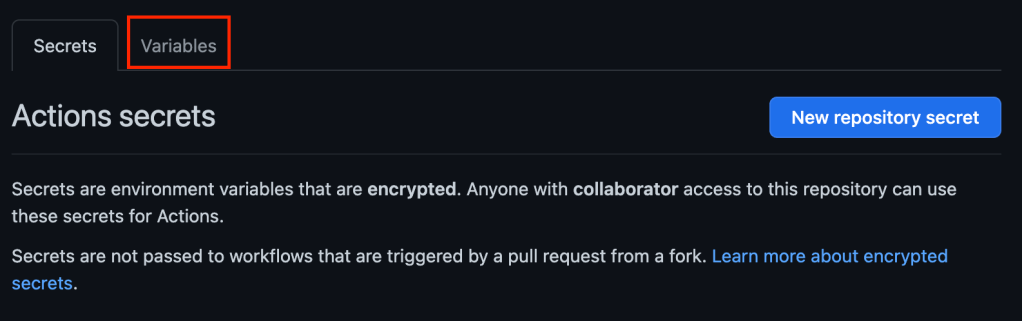
GitHub made it easy to store secrets for your actions at a repository or organization level, which is a critical step to keeping things like passwords and tokens out of plain text in repos. Unfortunately, there was no good way to store less sensitive information like a username or an S3 bucket name. Now GitHub supports variables for Actions as a public beta. The section for managing variables is in a tab next to where you edit secrets. If you didn’t see it at first, don’t worry, it took me a few minutes to find it.
Organization-wide Required workflows
Finally, we come to the feature I have longed for ever since my company moved over to GitHub, organization-wide required workflows. It is a public beta, but I can’t wait to use it. The first workflow I will require across multiple repos ensures the team checks all checkboxes on a PR before merging. Also, if anyone from GitHub is reading this, I would love that as an improvement to PRs. Over the past year, there have been a few workflows that I have wanted to add to the repos for the team at work, but I would need to add them in dozens of repos, and that was never going to happen. Are there any workflows you will require across any or all repos?
There were a lot of other items GitHub released last week, but those are five that caught my attention. I hope you found this list helpful, and if there are more features from GitHub you’d like to learn more about, let me know in the comments.
Smoothie in a bag
Sometimes when someone gives me the answer to a problem, I’m left thinking, “well, duh, why didn’t I think of that?”
For a few months, my doctor has been working with me on improving my diet. One of the consistent things she has tried to get me to do is move from a morning protein shake to a morning protein smoothie. I was very resistant to the idea.
I have experimented a lot with morning and evening routines over the years, and a recurring theme I have found with myself is that I need a simple brain-dead process.
Easy: Put a scoop or two of powder into a cup with water and shake
Hard: Pull out a half dozen things and add them to a blender, plus clean up
Yesterday, she brought up the smoothie idea again, but this time, she asked me if I had considered batch-prepping the smoothies in bags and just sticking them in the freezer until I was ready to make them.
💡
With this change, I think I’m now a morning smoothie person. I have a lot of tweaks to make to the ingredients, but I’m thrilled with the initial result.
Frozen avocado will likely be a staple, and I highly recommend it as it gives the smoothie a milkshake-like texture.
Also, I was initially worried about the almond butter I put in not coming out of the bag easily, but it froze while in the freezer, so it was alright.
Reframing Accomplishment
Today was a rough day at work, but I’m working on looking at it from a different perspective.
Last night right before I left for the day, a coworker reported an issue with something I was working on that was blocking his work. After looking into it, I realized his problem was caused by a problem I’d been trying to resolve for several weeks.
I put yet another bandaid on the problem, got him unblocked, and called it a day with a plan of spending today, finally resolving the root cause. I was also optimistic because my team lead and I had discussed this issue before the holiday break. He had an idea to resolve the issue.
I knew the problem, and I had a path forward; it was going to be a good day, and I was finally going to resolve a nagging issue that kept cropping up in unexpected places to give me a headache.
Unfortunately, that idea didn’t work, and neither did the four other things I tried. I wrapped my day up by talking with my team lead as we spitballed some more possible solutions. As we got off the call, I commented about how I didn’t feel like I accomplished anything today. This was when he laid down some wisdom that I’ve heard before, but I keep forgetting.
Accomplishing something does not require committing code. Today I found five more ways that won’t fix this problem. That is something, and it has moved us forward.
My lesson from today is that while I did not resolve the problem I set out to, that doesn’t mean I didn’t accomplish anything.
- No matter the circumstance you can always improve.
- You can always start improving with yourself.
- You can always start improving today.
– Kent Beck from the preface to Extreme Programming Explained: Embrace Change 2nd Edition
Hello, World!
There is a convention amongst programmers to start learning a new language by printing to the screen Hello, World!
I find it beautiful in its simplicity, ambitious in its scope, and it leaves me wondering what next?
 Dan Cook
You must be logged in to post a comment.