- Mitigate the issue
- Find the root cause
- Address the root cause
Order matters. We often skip the mitigation step and move to the root cause. This means that systems are broken longer than they need to be.
Order matters. We often skip the mitigation step and move to the root cause. This means that systems are broken longer than they need to be.
Last week was a solid week for GitHub releases. While only one stands out to me as super helpful, there was still a substantial showing of new features released and other subtler changes made to ease our lives.
Last week’s big news is that merge queues are now in a public beta. Have you ever been about to merge a PR only for someone to beat you to it, and now you need to update your PR, rerun CI, and get a new approval? Merge queues will help and handle most of the tedious work for you.
Merge queues will not inherently solve the problem of merge conflicts. However, they will make it easier to work in smaller chunks, which is the best strategy for avoiding merge conflicts.
This is not a feature that every repo or team will need, but for those who do, I think this will be a massive quality-of-life improvement.
Also worth noting is that enabling merge queues will require updates to your pipelines so that checks run at the right time.
on:
  pull_request:
  merge_group:
There were a couple of significant improvements to permissions. Dependabot alerts are now visible to anyone with write or maintain roles on a repo. Also, we can now create custom roles to manage branch protection rules. Previously, those things were limited to repo admins, leading to devs with more permission than they should have or no access to the tools they need.
GitHub also tweaked the Dependency graph for some JVM projects to show how you can get more info from your build into the graph. This is something that JavaScript projects already get out of the box, but it’s great that GitHub is making it easier for other languages to get these features.
Will merge queues make your team’s workflow better?
I’ve been watching the releases on GitHub closely for a bit, and this week did not see a lot of new releases, but there was certainly something interesting.
GitHub usually is good about giving us advanced notice before changes come out. How they rolled out Ubuntu 22.04 was a great example of this. There are also other things like Copilot, where there was an extended beta period before it became a product.
This week was a bit different. GitHub is updating the default GITHUB_TOKEN permissions to read-only in GitHub Actions. Before you get too worried, this is designed only to impact new repos, org, and enterprises. Existing repos, orgs, and enterprises will not have any changes, and new ones can enable the write permissions if they want.
Switching the default for the tokens to read-only is good, but it would be messy if they did not grandfather in existing repos. That said, if you work on one of those grandfathered repos, it’s still worthwhile to move to read-only tokens by default.
GitHub also released another change that impacted existing projects, and I suspect it caught many people by surprise. The January availability report briefly mentions it, but we’ll have to wait till next month’s report to get all the details.
On Tuesday, January 30th, GitHub released a change that could change the checksums for some git archives. They eventually reverted this change, and the availability report identified this as a 7-hour outage.
Looking at the timing of that notice going up, I doubt they realized this would happen. Their first reaction was to mention in the changelog that they do not guarantee the stability of checksums in autogenerated archives. If you are looking for a guarantee, the archives you upload are guaranteed to have identical checksums.
After quickly scanning the documentation for Releases, I did not find mention of the caveat around checksums and autogenerated artifacts, but I easily could have missed it.
There is a lot to learn from this. GitHub had an unexpected change made while updating a dependency. Their first reaction was to announce the difference and tell us they didn’t guarantee the functionality. Eventually, they rolled that change back, presumably because of complaints. Next month they will tell us more about what happened in their availability report.
I can’t say that I liked the initial announcement of the change, but GitHub has continued to address the issue with transparency, which I appreciate.
Would your team handle a similar situation as well?
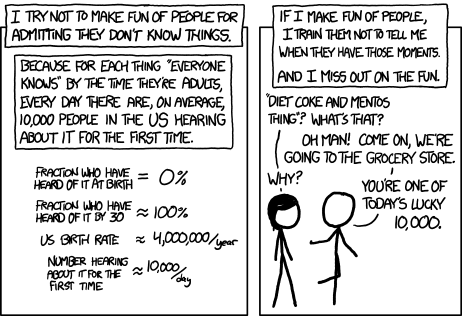
Ten Thousand or XKCD 1053 brings up a great point about how we handle when someone learns something for the first time. This is an exciting opportunity we should celebrate! I often fail at it, but this is how I want to react.
I spent the last month wearing the same outfit every day. Someone finally asked me about it yesterday, so I explained my experiment.
Decision fatigue is a thing. I never really noticed how much of a thing it was until I had Covid and the resulting brain fog. I started to think of myself as an RPG character with a certain number of “decision points.” Each decision, no matter how big or small, took one of these points, and when I was all out, making decisions would start pulling away from my energy level.
I never figured out the exact number of decision points I have, and I also suspect that it fluctuates daily. However, I realized they are a finite resource that I needed to conserve.
That is how I came to try wearing a daily uniform. Steve Jobs might be the most famous person to apply this idea with his black turtleneck, jeans, and sneakers. There are a lot of other examples, from Albert Einstein to Mark Zuckerberg, along with a growing number of folks like me trying to make their lives a little simpler. As I was talking about this idea, my friend suggested it was like being a cartoon character, and I might like that idea even more.
What was it like wearing the same outfit for a whole month?
Surprisingly easy. At first, I was self-conscious about wearing identical outfits every day. I thought people would say something about it, but only one person brought it up during the entire month, which was on the 31st day.
By the second week, I had realized that people either didn’t notice me wearing the same thing every time they saw me or didn’t care enough to mention it.
That’s not to say that I didn’t receive a decent number of compliments on the outfit choice, as it is a casual outfit that was a step or two up from my traditional t-shirt and shorts.
The other thing I realized in that second week was that picking from a selection of identical outfits in my closet was still a choice. This is where the most critical tweak during this entire process came in. I started laying out my clothes for the next day.
Getting dressed now has no thought process to it at this point. The clothes are laid out and ready for me in the morning. It sounds inconsequentially simple, but this was when I started to feel the freedom of being a cartoon character.
Another factor that led me to try this is I no longer need to worry about fashion. My outfit works when I go to the store, hang out with friends, or attend a networking event. As long as jeans are acceptable, I don’t need to worry. It is also surprisingly easy to find a casual shirt that goes with jeans and can transition from casual to business casual based on whether you roll the sleeves up.
On top of not worrying about fashion, I also don’t get distracted by clothing at stores anymore. I may see something I like as I walk through a store, but there is no more internal debate on whether I want to buy it. In many ways, this whole part of my life runs on autopilot.
If you want to try this experiment, I suggest getting enough copies of the clothes so that you don’t need to wear them every week. Wearing a uniform daily will show you how tough you are on your clothes.
Aside from my clothing choices, I am taking this idea of removing decisions and applying it in other areas of my life. The first two places that got this attention were how I stock my refrigerator and how I do my status updates at work.
I use a meal prep service, and every week I get a bunch of re-heatable meals delivered. Before I put them into the refrigerator according to which meal it is, I would then look through what I have as an option and pick something. Now I make my weekly menu in advance, deciding what lunch and dinner will be. Just as getting dressed in the morning is a matter of putting on the clothes I laid out the night before, picking out a meal is simply taking the top item off the stack.
Daily status updates are always a fun part of being a software engineer. I’ve done them for years, and still, I forget what I did the day before. I now write my status updates at the end of the day rather than trying to remember them in the morning. This practice has turned into a way to close down my day and leave myself with breadcrumbs for what I want to do the next day.
While none of these changes are particularly earth-shattering, they are helping me focus on other things that I find far more exciting.
Do you have any hacks to reduce decision fatigue?
Also, do you have any suggestions for a catchphrase?
Last week GitHub announced that 100 million developers are using GitHub. This is, of course, a tremendous milestone for them. What I found most interesting from that article was GitHubNext. This is the research arm of GitHub and where CoPilot came from. There are a lot of exciting projects they are working on there, but that is a topic for another time.
They didn’t let hitting the 100 million developer mark slow them down. There were still other things announced and released last week. One of the announcements I’d love more context on is that PayPal will no longer be supported to sponsor projects starting February 23rd. Credit and debit cards will still be supported if you want to sponsor projects. Removing a payment method from the outside makes it look like GitHub is making it harder for projects to get sponsors. The article also didn’t say much about why this change was happening, which leaves me thinking there was some dispute with PayPal.
Looking at new functionality though GitHub desktop received some love and has some improvements around force pushing. There were also some community contributions to the project, which is fantastic. It makes me so glad to see other projects with thriving communities. I was working with a closed-source tool last week and was constantly frustrated that I couldn’t just see the code to understand what was happening.
While GitHub Desktop gained the ability to force push whenever the web portal got an interesting new feature, there is now an API for reverting a PR. This is awesome as it is one less time that we need to use a force push. Hopefully, people will utilize this functionality because sometimes reverting is much faster than trying to patch.
Which of these are you most excited to try out?
Grep is a ubiquitous tool for searching plain text in *nix systems. It is so ubiquitous that the documentation for select-string in PowerShell mentions grep and the Oxford English Dictionary added grep as a noun and a verb in 2003.
While grep is incredibly well known, that doesn’t prevent it from having odd quirks that left me stuck debugging a script for hours.
If grep does not find the specified pattern, it exits with an exit code of 1 and kills the running script.
> echo "foo" | grep --count "bar"
0
> echo $?
1
> echo "foobar" | grep --count "bar"
1
> echo $?
0
It took me ages to recognize that my script was failing because of grep. I included the count flag because I needed the count for future logic, and I saw the correct count coming out but couldn’t understand why the script stopped executing there.
In hindsight, it was obvious, but it took me a while to get there.
The trick to using grep in a script that might return no results is adding an or true.
> echo "foo" | grep --count "bar" || true
0
> echo $?
0
> echo "foobar" | grep --count "bar" || true
1
> echo $?
0
Have you ever struggled and chaffed against stupid rules at work?
I know I have.
Why do I need to fill out this form?
Why does that group need to approve this?
Wait, we need to wait how long to release?
The list goes on and on, and so does the frustration. For years I was confused why so many places I worked had senseless policies that got in the way of me doing my job.
I remember this one episode from Malcolm in the Middle where Malcolm gets in trouble at work for not flattening boxes in the “designated box flattening area” and getting way more work done because he did the job the most efficient way he saw.
There is no point in having a “box flattening area.” Just get rid of it!
So why do we have these rules?
The people I’ve worked with genuinely want to make things better. I’m lucky, and it’s been a while since I’ve seen rules created to allow someone to create a tiny fiefdom inside a company.
So, where do the terrible rules come from?
Sticking with the “box flattening area,” I suspect that rule came about because of an accident. Something terrible happened, and afterward, people looked into what happened and came up with the idea of the “box flattening area” to prevent that kind of problem from happening again.
Does creating the “box flattening area” address the root cause of the issue? I have no clue it’s a contrived example in a TV show. It feels like a solution that quickly addresses the symptom rather than digging deeper to find the root cause.
It’s uncomfortable for folks to go through something like The Five Whys even if they are familiar with the technique, as it’s all too easy to sound accusatory when asking “why.”
There is also a challenge to removing rules once they are established. “That’s the way we’ve always done it” becomes an answer far faster than we realize.
Also, for most people questioning rules is an uncomfortable process.
We often ask ourselves, “Do I really think you know better than all the people who created this rule?”
What I’ve come to realize is that it is the wrong question. Instead, we should ask, “Do I have more information than those who created this rule?”
We almost always have more information, and we should not ignore that. The rule might actually have been the best available solution at the time, but now there are different solutions.
The next time you come across a policy that seems dumb, remember that it was made by well-intentioned people trying to solve a specific problem as quickly as possible with less information than you currently have.
It still might be an uphill battle to remove the policy, but approaching it from that angle will also make it seem like less of an attack on those who created it.
Have you ever pushed a commit to your CI server, waiting to see if all your tests pass only to discover an earlier step like linting failed before you ever got your answer?
This is super frustrating and has probably led to the death of more than a couple CI initiatives.
You can do something to make this a bit less painful.
Most build servers have some kind of flag to allow a pipeline to continue running even if an individual step fails.
This is how I allowed some steps to fail without immediately breaking the build using GitHub Actions.
Each step has a continue-on-error property.
- name: Lint
  id: lint
  continue-on-error: true
  run: yarn lint
Now even if the linting step fails, the following steps will run.
Unfortunately, GitHub does not show this well on the UI, and if nothing else fails, the job will succeed.
So we now need to make sure that the job correctly shows the failure, and we need to give feedback to the user about our step that failed.
First, let’s fail the job.
- name: Check linting
  if: steps.lint.outcome != 'success'
  uses: actions/github-script@v3
  with:
    script: |
      core.setFailed('The Linting step failed!')
Next, let’s write a message to the PR notifying the user of the failure. I use a service account for this, aka a GitHub account only used for programmatically doing stuff in GitHub Actions. If you want to just use the built-in GitHub token, you’ll need to adjust the permissions.
- name: Update Pull Request
  uses: actions/github-script@0.9.0
  if: github.event_name == 'pull_request'
  env:
    LINT: "linting\n${{ steps.lint.outputs.stdout }}"
  with:
    github-token: ${{ secrets.SERVICE_ACCOUNT_TOKEN }}
    script: |
      const output = `#### Linting\`${{ steps.lint.outcome }}\`

      <details><summary>Show linting output</summary>

      \`\`\`\n
      ${process.env.LINT}
      \`\`\`

      </details>`;

      github.issues.createComment({
        issue_number: context.issue.number,
        owner: context.repo.owner,
        repo: context.repo.repo,
        body: output
      })
These code snippets are licensed under the Unlicense. Go forth and have fun!
Last week there was an announcement of false alerts flagged in security logs, a prolonged outage, sunset announcements, and a few other updates that mainly impact folks using GitHub Issues, using Advanced Security, or managing enterprise organizations.
Along with all that, Git released 2.39.1 to address a couple of CVEs. The best thing to do is update your version of Git, but if you can’t, GitHub offers some remediation steps until you can upgrade.
GitHub also announced that some audit logs for branch protection rules were flagged as false alerts. The window for false alerts was between January 6th and 11th, and the logs were for protected_branch.policy_override and protected_branch.rejected_ref_update entries. Flagging the logs is an elegant solution to a problem around audit logs. GitHub never deletes audit logs but sometimes writes incorrect logs.
There was also a widespread outage on Thursday, January 19th, that lasted about 5 hours. I felt the impact of that outage as it impacted general Git operations and Actions. What frustrated me about this outage was less the breadth of the outage or the length of it, but rather GitHub posting the same status three times. I have a lot of empathy for the folks who worked this incident, and I know how much this is Monday morning quarterbacking, but seriously change up the status update.
I look forward to reading about this incident next month when GitHub releases its availability report.
Did you know that GitHub supported SVN endpoints? I did not, but don’t start using them now since GitHub will remove SVN support on January 8th, 2024. Feature debt is real, and I am always excited to hear about companies that decide to sunset a product, except Google. I’m still bitter about Google Reader. GitHub says that less than 0.02% of requests to their Git backend came through the SVN endpoints. I don’t know how much effort went into maintaining SVN support but take note of this approach. GitHub used data to determine how much a feature was being used and reached out to those who used it to find out what they needed to switch. Removing SVN support was a far longer road than we can see from the outside, but it resulted in new features to help those last few folks migrate all the way to git.
GitHub also deprecated CodeQL Action v1. They aren’t deleting the action, but I suspect if there is any security vulnerability found for that version, they will. One of the coolest parts of this announcement was that Depenabot could upgrade the workflows to v2 for you. If you haven’t checked out using Dependabot to update your dependencies on a schedule, it’s worth checking out.
Which announcement from GitHub caught your eye this week?
 Dan Cook
You must be logged in to post a comment.